
Barb is FieldGroove's AI reporting assistant. Instead of building a custom report from scratch, you type a question in plain English and Barb produces a live report right on screen — filterable, groupable, downloadable, and clickable through to the projects, customers, and inventory items behind the numbers.
You don't need to know SQL, database structure, or FieldGroove's report builder to use it.
How to use it
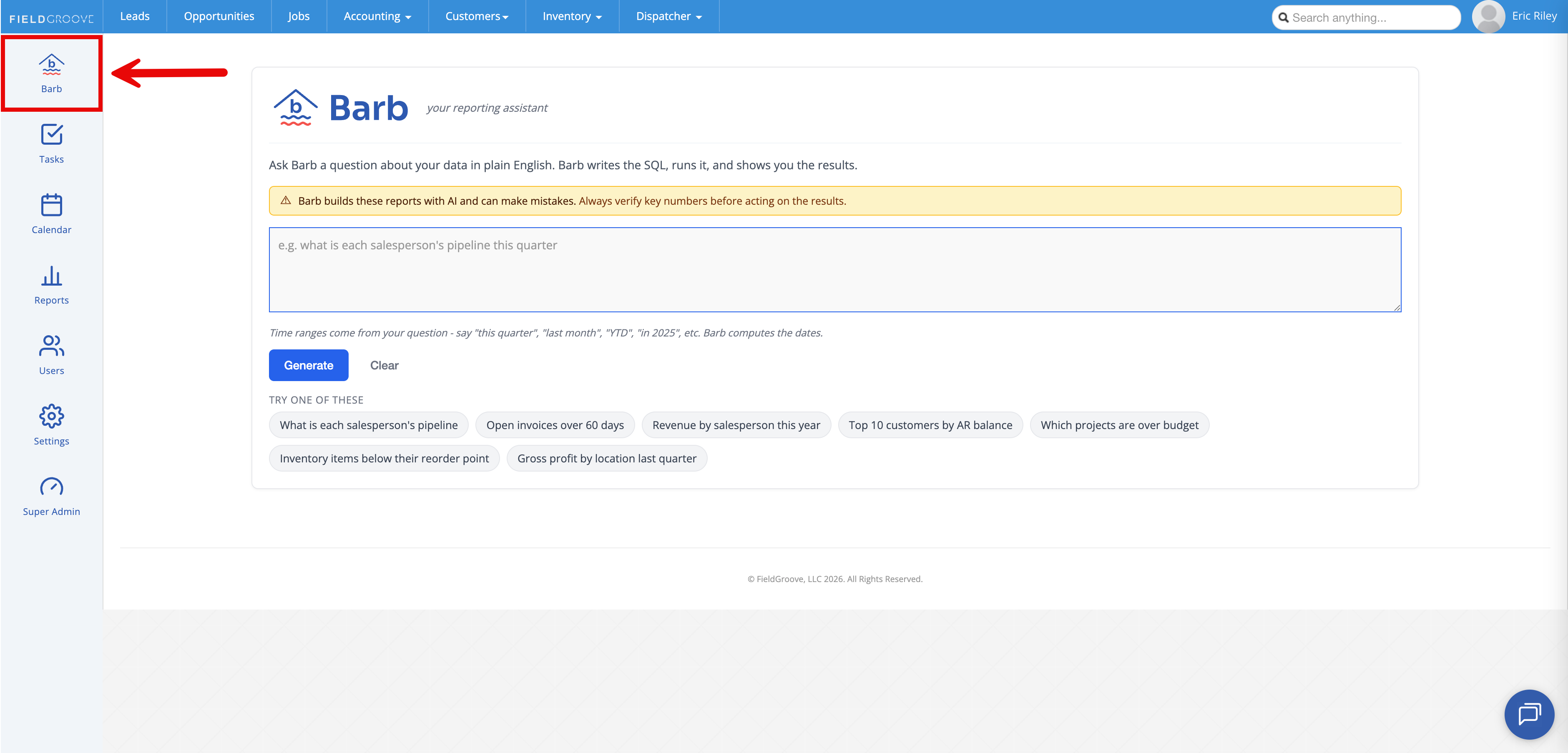
1. Open Barb. Click the Barb icon in the left sidebar (above Tasks). You'll see the prompt page.
2. Ask a question. Type in plain English. Some good starting questions:
- What is each salesperson's pipeline?
- Revenue by salesperson this year
- Open invoices over 60 days
- Which projects are over budget?
- Inventory items below their reorder point
- Revenue by product category year over year
- Top 10 customers by AR balance
Click Generate (or Ctrl+Enter). Barb thinks for a few seconds, then shows the report.
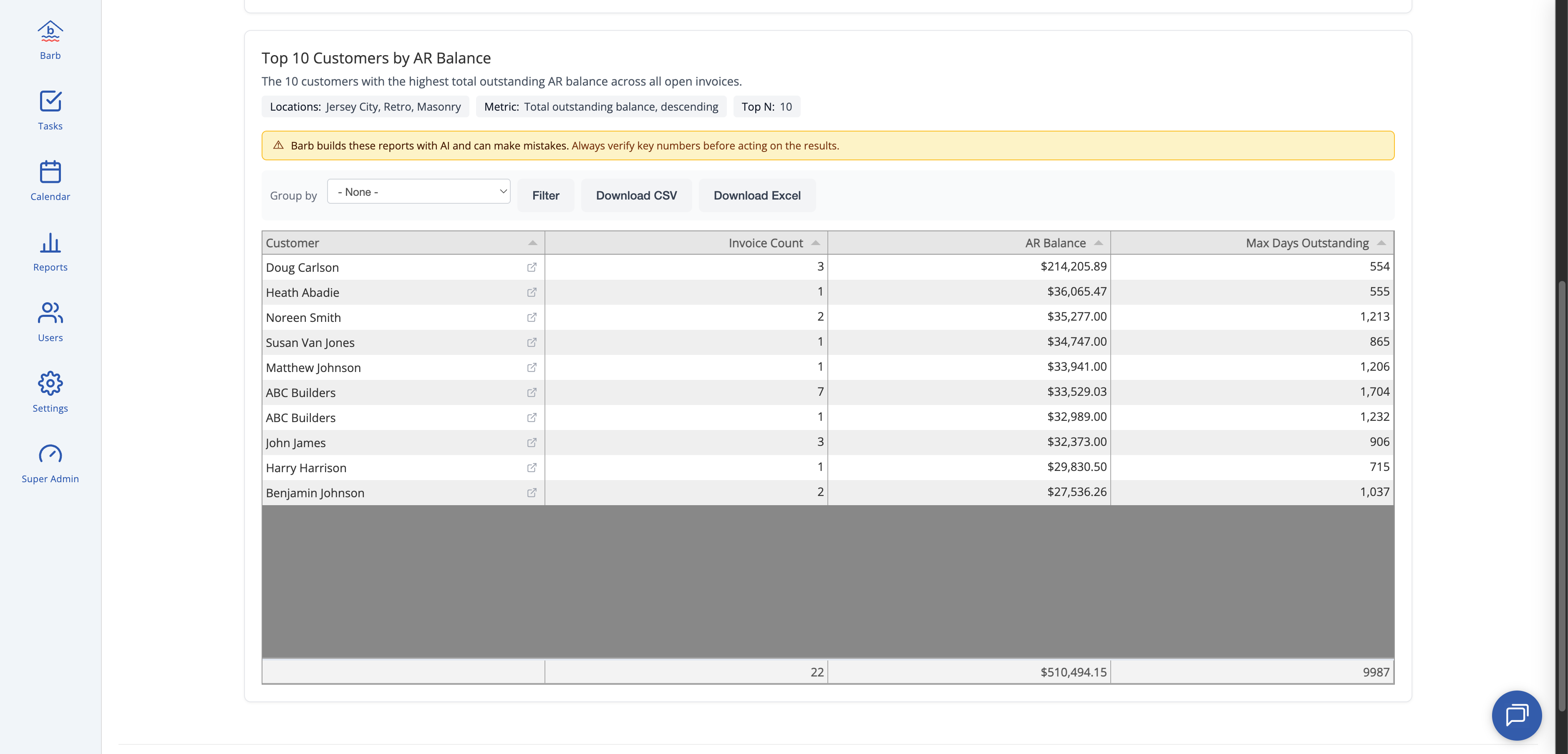
3. Refine with follow-ups. After the first report, keep going in the same conversation:
- Show that by location
- Add gross profit
- Only for last quarter
- Remove the salesperson column
- Show me the underlying invoices
Barb keeps context from your previous question, so you don't have to restate everything.
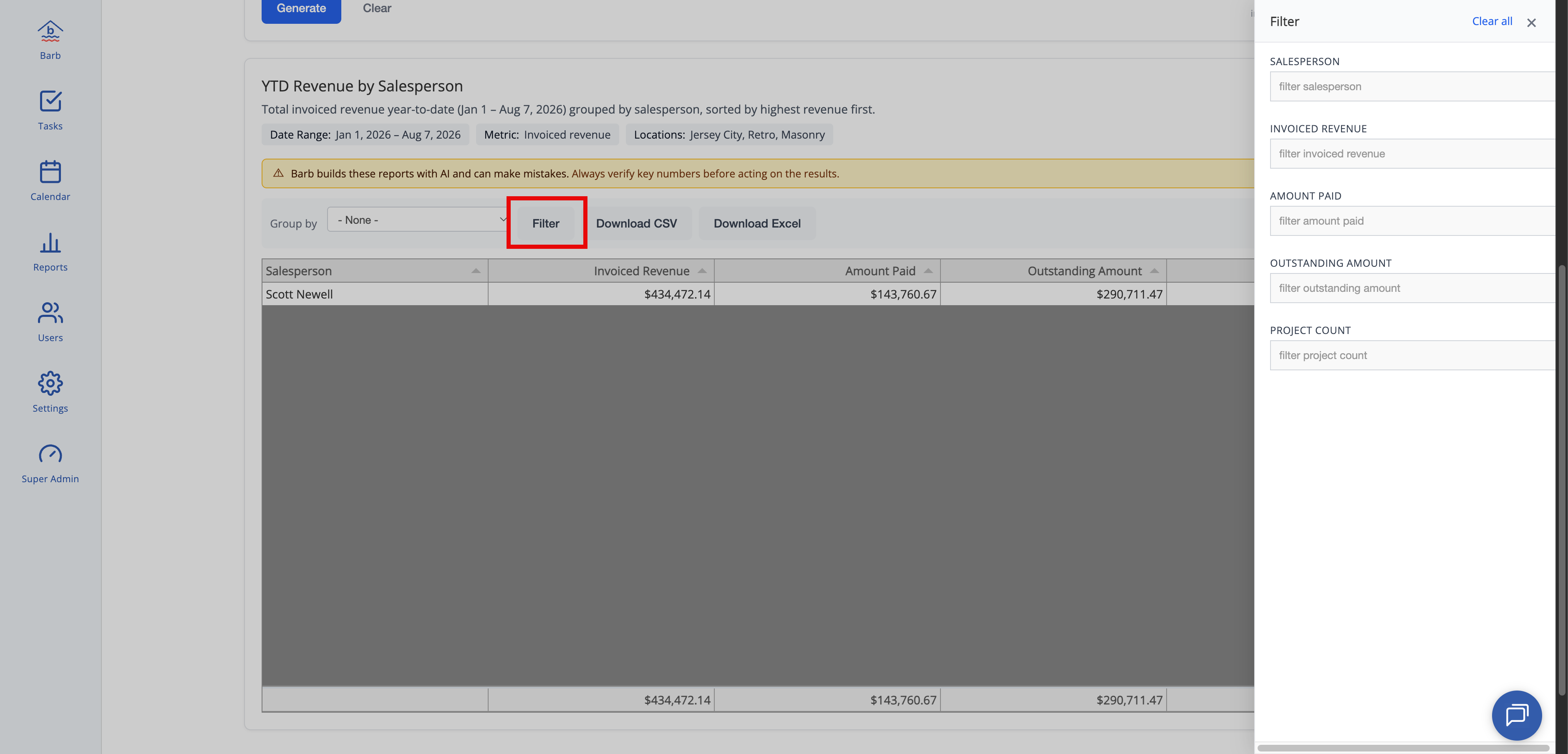
4. Filter, group, sort, download. Above the grid:
- Group by — collapse by any text column (Salesperson, Location, Status)
- Filter — opens a side tray where you can narrow rows by any column
- Download CSV / Download Excel — get the full result as a file
- Column headers — click to sort ascending/descending
5. Click through to the details. Rows that represent a single project, customer, or inventory item have a small ↗ icon next to the primary column — click it to open that record in a new tab.
6. Start a new report. Click × new report in the “Refining with Barb” chip to clear the conversation and start fresh.
Tips & best practices
- Say your time range in the question. Barb understands “this quarter,” “last month,” “YTD,” “in 2025,” “last 30 days.” No date picker needed.
- Ask about outcomes, not columns. “Who's my most profitable salesperson?” works better than trying to specify exact column names.
- If a first answer is close but not right, refine. It's usually one follow-up like “add invoice date” or “only accepted estimates” away from what you want.
- The top-nav location selector scopes Barb. If you have a specific location active up top, Barb only reports on that location's data. Switch to “All Locations” to see the whole company.
- Downloads keep everything. Filter, group, and column changes are visual — the CSV / Excel download always includes the full result Barb got back.
Common questions
Is my data safe? What does the AI see?
Your data never leaves FieldGroove's servers. The AI vendor (Anthropic) only sees the schema of the tables Barb is allowed to read, your question, and any prior questions in your current conversation — never actual customer names, invoice amounts, or any row data. When Barb queries the database, it uses a special read-only account that physically cannot modify data.
Who can use Barb?
For now, users with the Administrator or Accounting role only. We're keeping it admin-gated in v1 so we can watch how it's used and gather feedback before opening it to other roles.
Who can see the reports I generate?
Only you can see the reports on your screen. Every question and result is logged internally for security auditing and to help us improve Barb's answers — no one outside FieldGroove sees your reports.
Why is my Barb report different from the Sales Detail Report by a few dollars?
Different reports sometimes use different definitions of the same word. For example, Barb's “Invoiced Revenue” sums the invoice header totals; the Sales Detail Report may also subtract credit memos and small adjustments. Neither is “wrong” — they answer slightly different questions. If you see a variance you can't explain, ask Barb to break the number down (e.g., “list the invoices behind that total”) and compare to your source.
Barb said she doesn't have data for X. What now?
When Barb can't answer a question with the data available today, she says so explicitly (called an “insufficient catalog” response) and describes what's missing. These are useful signals — please forward them to us at support@fieldgroove.com so we can consider adding the missing view or data source in a future release.
Why do refinement questions sometimes fail with “no context”?
Very short refinements like “list them” or “show more” can be ambiguous. If Barb asks for clarification, add a little more detail: “list all the invoices behind the totals” or “show me the projects for the top salesperson.”
Can I save a Barb report as a permanent named report?
Not yet — this is on our short-term roadmap. For now, download to Excel or CSV and share the file.
Can I schedule a Barb report to run every week?
Not yet — scheduling is on the roadmap. Today, Barb reports are on-demand.
How accurate is Barb?
Barb is powered by AI and can make mistakes — always verify key numbers before making decisions or sharing them widely. Every report shows a warning banner reminding you of this. If Barb gives you a number that looks wrong, cross-check against an existing FG report or your source system before acting on it.
Known limitations
- Admin roles only in v1 (Administrator, Accounting)
- No scheduled or emailed reports yet — everything is on-demand
- No “Save as Report” yet — downloads only
- Some capability gaps — for example, no per-county tax breakdown, no duplicate-customer detection. Barb will tell you when a question is out of scope.
- AI-generated results can contain errors. Verify before acting.
Related articles
- PDF Document Studio →
- FieldGroove Reports overview
- Managing user roles and permissions